A phone icon beside a search ad is easy to count. A useful sales conversation is harder. If your Google Ads reports show plenty of “call conversions” but your team says few callers are a fit, the first question is what the conversion action actually measures: a tap, a connected call that crossed a duration threshold, or an outcome confirmed by sales.
This guide shows how to set up Google Ads call conversion tracking for a service business, including calls placed directly from ads, calls made after a website visit, and qualified calls recorded in a CRM. You can use the same framework for an agency, clinic, repair company, or consultancy. The mechanics depend on your country and the way callers reach you, so start by choosing the measurement path before installing tags.
Decide which phone action deserves the word “conversion”
Google Ads offers several phone measurement methods. They answer different questions, and a campaign can use more than one. Google’s overview of call conversion types is a useful reference when the interface labels change.
Call directly from an ad
A person uses the call button on a call asset or call ad. With call reporting and a Google forwarding number, Google can report call details and count a call after your chosen minimum duration. This is the clearest native way to measure calls that never visit your website. The call asset should point to a line that someone can answer during the hours it appears; Google documents scheduling for call assets.
Call a number displayed on your website
A person clicks your ad, lands on the site, sees a number, and calls it. Website call tracking uses a Google tag and a phone snippet to replace the displayed business number with a Google forwarding number for eligible ad visitors. The visitor can tap the number or dial it manually. This is distinct from tracking a click on a tel: link. Google explains the tag and number-replacement requirements in its website call setup guide.
Tap a phone number on a mobile page
If you measure clicks on your website’s phone link, you measure the tap, not proof that the call connected. The person might close the dialer, reach voicemail, or hang up before speaking. Google is explicit about this in its mobile phone-number click documentation. Label the action “Phone link click,” not “Qualified phone lead,” and treat it as a weaker signal.
Become a qualified lead or customer after the call
Someone in sales reviews the conversation and records the outcome. That judgment lives in your call system or CRM, rather than in the call-duration rule. Where Google’s call import is supported, you can send the valuable outcome back as a separate conversion action. For a lead-generation business, this is often the most useful eventual signal for evaluating spend, provided the matching and data quality are sound.
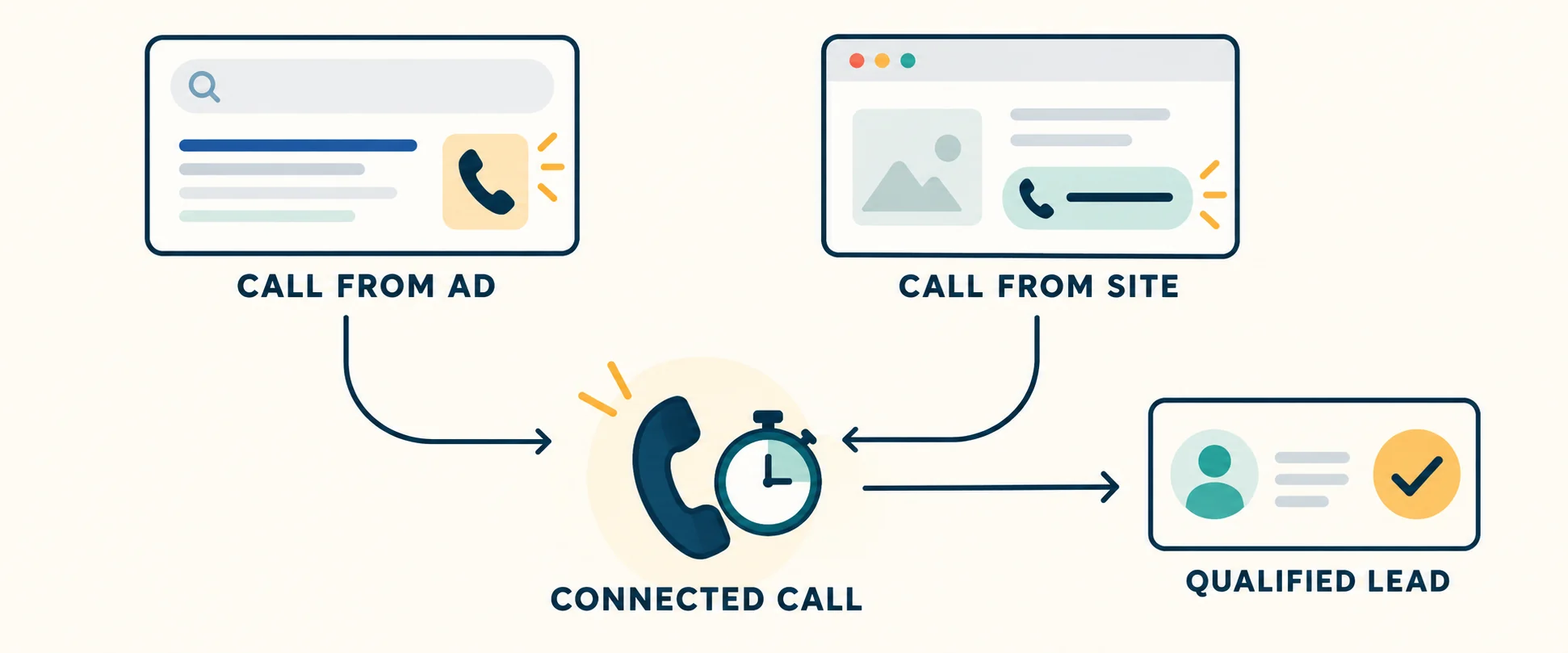
Two call entry points can produce the same kind of connected conversation; only the later sales review establishes whether that conversation was a qualified lead.
Check the prerequisite that can change your whole plan
Google forwarding numbers are required for its native call-duration tracking from ads and website numbers, and for imported call conversions. Availability varies by country. Check the current Google forwarding number country list before promising call-level attribution. At the time of this guide, Kazakhstan is not on that list; the list can change. If your market is unsupported, a call asset may still be useful, but a phone-link click or a separate call-tracking provider should not be reported as a verified Google call conversion without checking what it truly captures.
Also decide which phone numbers and destinations matter. If your site rotates numbers, routes calls to different branches, or shows a number inside a third-party booking widget, a default one-number snippet may be insufficient. Google says its default JavaScript tag tracks only one number on a page; multiple numbers require a more advanced setup. Inventory the visible number on each landing page, its tel: destination, business hours, and the person or queue that answers before you install anything.
Set up calls that start in the ad
Use this path when the searcher can decide to call without opening the site. In Google Ads, open Goals → Conversions → Summary, create a phone-call conversion action, and choose Calls from ads. Google’s current phone conversion setup describes the available paths. Turn on call reporting in account settings when the forwarding-number option is available, then add or review the call asset at the account, campaign, or ad-group level.
Set a minimum duration based on your real call log, not a universal “best” number. If a receptionist usually identifies a legitimate project in under a minute, an arbitrarily long threshold will miss useful calls. If your queue plays a long greeting, a short threshold may reward waiting rather than a conversation. Sample answered calls with different durations, note when a useful discussion begins, then choose a starting threshold and revisit it after collecting data. Duration is a filter, never a substitute for qualification.
Set asset hours to match actual coverage, especially if a missed call has little chance of a callback. Put a direct line or an effective routing system behind the call button. Document the conversion action’s name, threshold, counting setting, and whether it is Primary or Secondary, so a later editor does not accidentally count the same call twice.
Set up calls made after an ad click to the website
Choose Calls from website and the option for someone calling a number shown on the site. Add the Google tag if it is not already installed correctly, then install the phone snippet on pages where the number appears. The number you enter in Google Ads must match the displayed number’s digits and country-code format. The snippet replaces it for eligible visitors with a forwarding number; keep the ordinary business number visible to other visitors. Follow the generated installation instructions for your own tag or Google Tag Manager rather than pasting a generic conversion ID from an example.
Check both the text number and the clickable phone link on mobile. A visitor who sees a forwarding number but whose button still dials a different destination can break your measurement or user experience. Check sticky headers, footer numbers, branch landing pages, and responsive versions separately. If a third-party widget controls the number outside the code you can edit, test whether the snippet actually changes it; do not assume the page-level tag reaches inside every embedded interface.
Use Google Tag Assistant to confirm the tag and conversion snippet on relevant pages. Google’s instructions also describe testing the replacement after arriving through an ad; such a click may incur a charge. A normal direct visit should retain your business number. Record the displayed number, the dialed destination, and whether the call appears in the call-details report. Test only in a supported market and on a real number your team can answer.
If all you can implement is a tracked click on a mobile tel: link, use that as an observation signal. It can tell you which landing pages prompt intent to call, but cannot verify call connection, duration, or sales fit. Keep the action’s name and bidding status honest.
Make a separate definition for a qualified phone lead
Before importing outcomes, write a short rule your sales team can apply consistently. For example, “A qualified call is a real person asking about a service we offer, in an area we serve, with enough contact detail for a follow-up.” Then define exclusions such as current-customer support, wrong numbers, recruitment, vendors, and calls with no conversation. A request for a quote might merit its own stage; a sale should have its own outcome and value.
Log each call’s source, call time, answered or missed status, owner, CRM contact, qualification outcome, reason for rejection, and next action. If the caller already submitted a form, link both touchpoints to one person or opportunity. This keeps the call report from inflating the number of distinct prospective customers. The same discipline used in lead qualification questions for service businesses and a lead-response process applies to phone inquiries.
Where the required Google forwarding numbers and call details are available, create a separate Calls via uploads action for the CRM-confirmed outcome. Match the imported conversion to the recorded call using the identifiers and timestamps required by Google’s import template or API, and upload only outcomes your team has actually reviewed. Start with a small, reconciled sample before automating. Google’s call import instructions and Ads API guide cover the required fields and failure cases. This route is different from Enhanced Conversions for Leads, which addresses the matching of website leads and later CRM outcomes.
Do not make both a duration-based action and the imported qualified outcome biddable for the same call without a deliberate plan. In Goals → Conversions, Google’s Primary and Secondary settings control which actions feed the “Conversions” column and bidding when their goal is selected. One practical sequence is to observe qualified-call imports as Secondary while checking match rate and delay, then decide whether to use that outcome as Primary and move the overlapping duration proxy to Secondary. A custom goal can change the usual Secondary behavior, so review the actual campaign goals as well.
Read the reports without confusing calls and conversions
Open the call-details report and compare received calls, missed calls, duration, and the conversion action that fired. Google distinguishes Phone calls from phone call conversions: a call can be recorded but fall below your minimum duration. It also notes that a phone call can be dated to the day it happened while its attributed conversion appears on the ad-click date. That matters when reconciling a daily CRM export with an Ads report. See Google’s call reporting definitions.
A simple weekly review can use four counts from the same period: ad-originated calls, connected calls, qualified callers, and booked opportunities or sales. Break out missed calls and calls outside staffed hours. Look at the rate from connected call to qualified caller and the rate from qualified caller to opportunity, while keeping each denominator explicit. If call volume rises but qualification falls, examine search intent, location, ad copy, and the opening of the sales conversation before treating “more calls” as a win. Your search-terms review can help find irrelevant queries; your CRM supplies the fit assessment.
A launch checklist you can actually verify
1. Audit the existing goals. Note every call-related conversion action, its measurement method, Primary or Secondary status, and the campaigns using its goal. Retire or demote overlapping actions deliberately.
2. Confirm eligibility and routing. Check forwarding-number availability, the live destination number, queue behavior, and staffed hours. Write down what the call asset and each landing page will show.
3. Test the exact user path. Check the ad call separately from the website call and the mobile phone-link click. Verify the displayed and dialed numbers, whether the call was received, and whether the appropriate action appears. A tag firing alone is not a completed call.
4. Reconcile with the CRM. Compare a small set of real calls by time and outcome. Explain each difference before trusting aggregate totals; date attribution, missed calls, short calls, and duplicate contacts are common causes.
5. Review bidding after data accumulates. Check the campaign’s selected goals and the “Conversions” versus “All conversions” columns. Change the Primary signal only when you can defend its meaning and verify the incoming data.
Good call measurement is a chain of evidence: the ad or page that prompted the contact, a real connected conversation, and an outcome your team can explain. Start with the strongest signal your market and systems can support. Keep weaker taps and duration proxies clearly labeled, and use the CRM to learn whether the caller was someone the business could actually help.